Designing human-AI collaboration for creative flow and productivity
I approached FlowSpark as an AI designer, focusing not on polished screens, but on how the AI thinks, responds, and supports users.
FlowSpark is a creative productivity coach that uses AI to understand your mindset and suggest personalized micro-activities based on your design process.
Built 0→1 entirely within Lovable, without Figma or traditional tools, I focused on core user logic, conversational flow, and emotional tone, proving that impactful AI experiences start with behavior-first thinking, not just pixels.
role
AI Product Designer
team
Solo
timeline
2 weeks

How did it all start?
As a creative professional, I've often found myself staring at the screen, knowing I should be working but feeling mentally blocked. Not lazy. Just... foggy.
"Why can't I think straight today?"
That simple question became the seed of FlowSpark. I wasn't trying to build another to-do list. I wanted to create something that meets creatives where they are, especially on the hard days.
To understand the real struggles creatives face, I surveyed designers, artists, and digital makers about their process. Their responses revealed a shared emotional rhythm: some days flow, others feel foggy, blocked, or burnt out.
survey findings
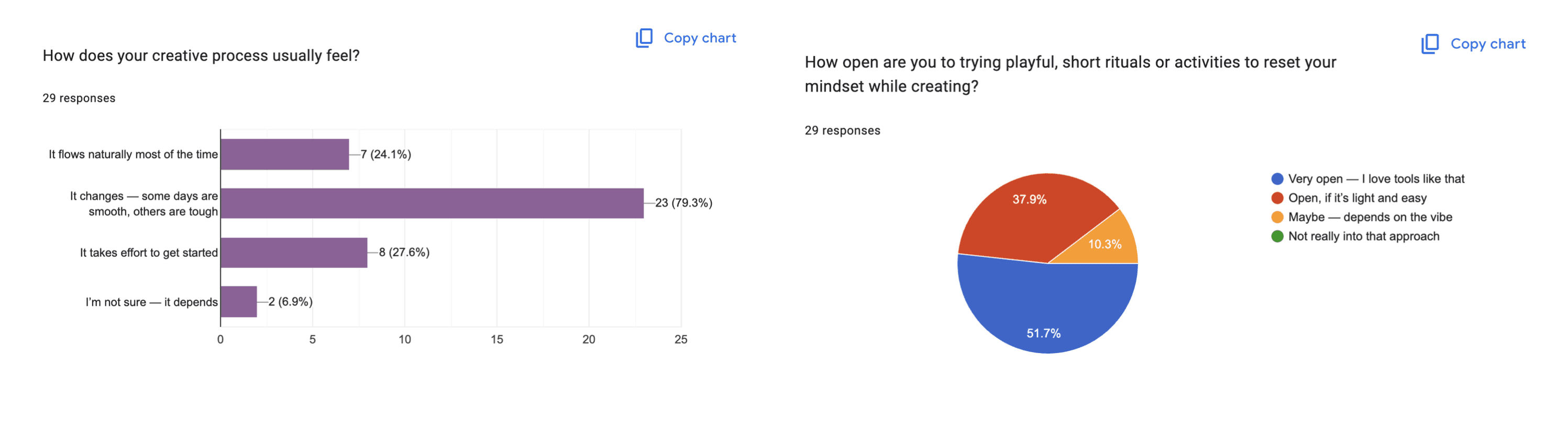
Here's what stood out:
"It changes — some days are smooth, others are hard."
"I try to push through or talk to people."
"I wish there was something for burnout... or to help get started."
Survey results showed that 90% of creatives were open to playful, short activities to reset their mindset, if they were light and emotionally attuned.
This validated my insight that creatives don't need pressure; they need gentle, well-timed support.
This insight became the foundation for FlowSpark: a tool designed not to structure creativity, but to support it, contextually, playfully, and emotionally.
design challenge
How might we design an AI experience that supports creative flow by responding to emotional context, without overwhelming or distracting the user?
How I built the first version - fast & focused
BUILDING FLOWSPARK USING LOVABLE
I built FlowSpark entirely in Lovable with help from ChatGPT and Claude, without traditional tools like Figma.
This forced me to focus on what really matters in AI UX:
The logic behind the flow
The tone of the AI
The emotional timing of each interaction

How FlowSpark thinks?
DESIGninG AI LOGIC AND PROCESSING
As an AI designer, my first challenge wasn't the UI, it was the system behavior:
What should the AI understand?
When should it act, and when should it listen?
How do we make AI emotionally supportive, not overwhelming?
FlowSpark’s core intelligence comes from its ability to understand why someone is creatively stuck, not just what they’re working on. I created a lightweight decision system that maps emotional input to the right kind of Spark.

To support AI logic and UX of FlowSpark’s recommendations, I created a custom activities database mapping emotional states, creative phases, and user modes to the right kind of creative nudge.

Some design choices that made FlowSpark
why micro-activities?
When someone's feeling creatively blocked or mentally foggy, big tasks feel overwhelming, even small decisions can cause friction. Through my research and personal experience, I found that what most people need in those moments isn't a deep process but a gentle push.
That's why FlowSpark is built around micro-activities: short, 5-10 minute creative prompts that are designed to be low-pressure, high-reward. They help users break inertia, feel a small win, and re-engage with their work, without needing motivation to start.

A MOMENT I CHOSE NOT TO INTEGRATE AI

This taught me a core principle: control beats convenience. Manual input felt slower but built more trust than auto-detection.
EXPLORING THE RIGHT FORM AND FLOW
At the start, I wasn't sure what shape FlowSpark should take. I explored a few directions:
A chat-based coach
A game-based experience
A journaling space
A creative mood tracker
After exploring these different formats, I realized that creatives experience stuckness in different ways. Some days you want to talk it out. Other days, you just want to do something and get unstuck fast.
That's why I designed two distinct flows in FlowSpark:
TWO INTENT-DRIVEN FLOWS FOR GENERATING A MICRO-ACTIVITY
Try a Spark (Non-Chat-Based Flow)
For moments when users don't want to talk, they just want action. This flow uses a short onboarding (mood, phase, blocker) to quickly match the user with a micro-activity that fits their state.
This follows a single-turn generation pattern:
User provides context → AI processes → Activity suggested
Talk to AI Buddy (Chat-Based Flow)
For reflective, low-energy moments when a user needs to process what's going on. The AI Buddy listens, asks thoughtful questions, and gently co-creates a path forward.
This follows a multi-turn refinement pattern:
User shares → AI listens and clarifies → Co-creates solution → Suggests activity → User feedback → AI refines
shaping the voice and behavior
When I first prototyped FlowSpark in Lovable, the initial interfaces and AI interactions felt a little off. The logic worked, but the experience didn't feel human. The tone was too stiff, the suggestions too generic, and the system often left users hanging if their input wasn't clear.
I had to treat the AI like a personality, not just an output engine. So I went back and refined the system layer by layer.
PROMPT TESTING
I experimented with different prompt structures to get better suggestions from the AI. I tested how phrasing affected tone, length, and cognitive load.
TONE TUNING
I made sure that the tone and language of the app is encouraging and not too pushy at the same time, iterating multiple times on AI-generated text.
FALLBACK PLANNING
When input is vague or conflicting, the system defaults to safe, universally helpful activities. Also included re-generate options and error handling.
the flowspark session


practices behind flowspark
KEY AI ETHICAL DECISIONS
User Agency First: Option of choosing manual mode input over auto-detection
Transparent Logic: AI reasoning is visible through "Why it helps" sections
No Judgment: AI never pressures or shames; supports creative blocks as normal, not failures
Minimal Data: Only captures mood + blocker type, no personal creative content
FEASIBLE AI DECISIONS
Simple Tech: Built on rule-based logic
Inclusive Testing: Validated prompts with creators from different backgrounds and energy levels
10-Minute Respect: Designed for low-energy states, no overwhelming features
Escape Hatches: Easy to skip, pause, or change direction with no forced workflows
next steps
FlowSpark started as a behavior-first prototype and now it's evolving into a more complete MVP experience.
Here's what I'm focusing on next:
MVP building - Refining and launching an MVP version with end-to-end flows and data tracking
Improving the AI Buddy experience to feel more conversational, emotionally attuned, and better at guiding
Growing the Spark library with new activities tailored to more emotional states, project phases, and team dynamics
Introducing lightweight AI memory so FlowSpark can avoid repeat prompts and suggest Sparks based on recent sessions
Opening up to more creatives and design teams to gather feedback, test tone, and refine activity mapping